Electronics Build Guide MKS TinyBee
Set up the MKS TinyBee for a four-axis Wi-Fi CNC foam cutter, from installing FluidNC and bench testing the motors to homing, calibration and the first cut.

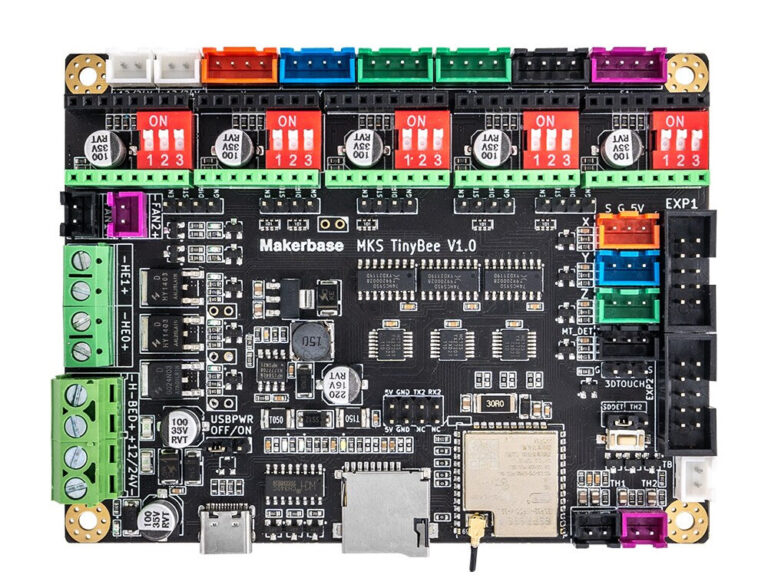
Set up the MKS TinyBee for a four-axis Wi-Fi CNC foam cutter, from installing FluidNC and bench testing the motors to homing, calibration and the first cut.

This guide shows how I use a BTT SKR Pico board with grblHAL firmware to control my four-axis CNC foam cutter. It covers loading the firmware, connecting the motors, setting the driver current and checking the movement before making a cut.. Thanks to advancements in 3D printing, the electronics for a foam cutter are now…

Introduction This guide will walk you through the steps to build the electronics for a CNC foam cutter. The MKS Gen L boards are highly reliable, and I’ve used them successfully in many projects. Thanks to advancements in 3D printing, the electronics for a foam cutter are now affordable and easy to source Advantages:- Disadvantages:-…

Introduction This guide will walk you through the steps to build the electronics for a CNC foam cutter using the Arduino Mega 2560 with a RAMPS 1.4 board. This is a great combination, and I’ve made many projects with them. Thanks to 3d printing, the electronics for a foam cutter are quite affordable and easy…

If you’ve just finished building your CNC and turned on homing for the first time — only to find it’s not working right — don’t worry. This is one of the most common hiccups new builders run into. The good news is, it’s usually something simple, like a wiring issue or a small setting that…

This guide walks you through exactly how to set up the GRBL HotWire system I’ve developed since 2020. It’s designed for hobbyists, not engineers, and it works with several affordable controller boards. Whether you’re building your first cutter or upgrading an old one, follow the steps below and you’ll be cutting accurate wing cores and…

The hot wire bow is my preferred way to tension the wire for CNC foam cutting. The picture below shows my bow which I use on my CNC foam cutter. Advantages of using a bow The bow doesn’t exert tension between the left and right carriages but the spring method does. When foam cutting wings…

For CNC foam cutting, you’ll need at least a 4-axis controller to handle the simultaneous movement of the hot wire and the workpiece. More advanced setups — such as 5-axis foam cutting with a rotary table — are also possible for complex shapes. Over the years, I’ve tried several different controller types for my foam-cutting…

DevCad provides several Foam applications for generating g-code for your project. Whether that is an RC model airplane or a generic foam shape. I have been contacted a few times asking me which one should I use. So in this post, I’ll explain the foam applications, and then you can decide which one is best…

Using 3d printers has become increasingly popular for making all types of CNC machines. The term you see quite a lot is MPCNC(Mostly Printed CNC). Many guys have sent pictures to me showing how they have made an MPCNC for foam cutting. I’ll include a design you can 3d print for free, courtesy of Mario…

I often get asked if I can supply CNC Foam Cutters as a kit. For several reasons, I can’t produce a self-assembly kit. So are there any kits you can purchase? Yes, there are a few, but not many. Here is what’s currently available at reasonable costs to the hobbyist. I’ve excluded some due to…

The Problem: running out of machine travel If you’ve ever tried cutting a high-sweep design like a flying wing, you’ve likely hit a frustrating wall: running out of horizontal travel on your CNC foam cutter. I use a clever alignment trick in DevWing Foam (and previously Profili 2 Pro). By aligning the leading or trailing…

The 4-axis CNC foam cutter, until now, required a Windows computer to run the software to send G-codes to the controller. Several times, I have been asked if there is a way to run the foam cutter like a 3d printer by just inserting an SD card with the g-code. Recently, I upgraded my 3d…

In the post, I’ll explain how I built my CNC Needle Cutter to cut foam boards for RC aeroplanes. If you’ve made any foam board RC aeroplanes, you know there is a lot of cutting. I wanted a better method to cut these parts out. Why a CNC needle cutter? I did consider a diode…

The latest firmware works on both MKS Gen L boards. This post has all the details Use the MKS Gen L Boards for CNC Foam Cutting

For some time I’ve been wondering if I could use Fusion 360 to generate g-code for a 4-axis hot wire foam cutting. Unfortunately, AutoDesk doesn’t include foam cutting in the Manufacturing section. I’ve had a request in the AutoDesk forum for several years but never received any response from them. Parallel Cuts Only So, can…

What is the Kerf? Kerf is defined as the width of material that is removed by a cutting process. So in our case it’s the amount of foam melted by the hot wire. To get accurate parts we need to know how much foam is melted away by the hot wire. So before we can ascertain…

You’ve built your 4-axis CNC foam cutter, and now you need software to generate G-code for your foam wings or fuselage. If your budget allows, purchasing software might be the best option. DevWing Foam 2 and DevFus Foam are excellent choices—I use them for all my projects. You can find tutorials on these programs both…

You’ve built your 4-axis CNC Foam Cutter, and now you need some software to send the g-codes to hotwire cut your foam wing or fuselage. LinuxCNC is a great software which sends g-code to your foam cutter. For the hobbyist, you need to use the old parallel printer port. It won’t work with a USB…

You just built your Hot Wire CNC foam cutter, but it’s not working as expected. I receive questions from people worldwide who have had issues getting their machines up and running. USB Driver problems Recently (December 2024), several users of the CNC Foam cutter reported problems. Check this post, USB CH340 Driver Problems A recent…
We use cookies to improve your experience on our site. By using our site, you consent to cookies.
Manage your cookie preferences below:
Essential cookies enable basic functions and are necessary for the proper function of the website.
Google reCAPTCHA helps protect websites from spam and abuse by verifying user interactions through challenges.
Google Tag Manager simplifies the management of marketing tags on your website without code changes.
Statistics cookies collect information anonymously. This information helps us understand how visitors use our website.
Google Analytics is a powerful tool that tracks and analyzes website traffic for informed marketing decisions.
Service URL: policies.google.com (opens in a new window)
You can find more information about our Cookie Policy and Privacy Policy.