What Controllers can I use for CNC Foam Cutting

For CNC foam cutting, you’ll need at least a 4-axis controller to handle the simultaneous movement of the hot wire and the workpiece. More advanced setups — such as 5-axis foam cutting with a rotary table — are also possible for complex shapes.
Over the years, I’ve tried several different controller types for my foam-cutting projects. Some work only with specific software, while others are more flexible. Below, I’ll break down the main types of controllers that hobbyists can use, and the pros and cons of each.
PC Controller vs. Microcontroller
When I first started, I used a PC-based controller with an old parallel-port computer. The key difference between a PC controller and a microcontroller is where the G-code is translated into step and control signals:
Microcontroller-Based Controller: A small board (like an Arduino or dedicated CNC controller) reads the G-code and generates the step signals itself. This setup is usually more compact and doesn’t tie up a full PC.
PC Controller: The PC does the heavy lifting, sending step signals directly to the motors. It usually requires a dedicated computer with a real-time parallel port.

On a PC controller, the software running like Mach3 or LinuxCNC takes the g-code and converts that to the pulse and control signals that it sends to the control board via a connection such as USB or a parallel port, So there is no need to install firmware like a microcontroller
With a microcontroller, this is all done on the board, which has the software(firmware) to do this. GRBL and DevCNC Foam are good examples of this. So all we do is send the g-code.
There are advantages and disadvantages to both, which we will discuss with each type
PC Controllers
A PC controller will probably be more expensive unless you use an old parallel port computer.
The PC Controller is more versatile and can be used for many types of CNC, such as foam cutting, routing, and laser cutting, just by changing a configuration file and connecting to a different machine. This is how I ran my old Foam cutter and CNC router on the parallel port interface.
So how do you connect the controller board to a modern PC? There are several options.
If you want a USB connection, then you are probably going to need Mach3 or 4 software. The license for these starts at $150. You will also need a USB control board or a specialised USB to parallel adapter. My first-ever CNC cut was made using Mach3 on the parallel port

The other option is LinuxCNC, but this won’t work with USB; it still works well on the old parallel port. The software is free but you will need a special interface card to use it on a modern PC or laptop. Mesa makes several and you will need a dedicated PC to run LinuxCNC. There is also one that can use a Raspberry Pi instead of a PC.

You will need to use a separate Hot Wire control to heat the wire. I used to use my iCharger 206B with its foam cut option.
MicroControllers
Microcontrollers are probably the simplest and most cost-effective solution for hobbyists. The firmware running on the controller is specifically designed for foam cutting and can also include hot wire control
Here are the most popular solutions for CNC foam cutting with a USB connection.
Arduino Uno with a CNC Shield. This will only work with DevCNC Foam for foam cutting and needs a license from Dev Cad. To control the hot wire, you will need a separate circuit.


Arduino Mega 2560 with a RAMPS board. Works well with DevCNC Foam and GRBL Hotwire. DevCNC foam is almost a plug-and-play solution whereas GRBL needs the firmware to be uploaded first.
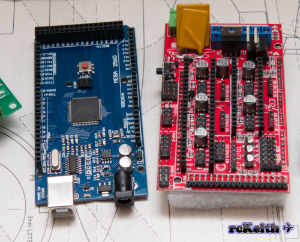
MKS Gen L V 1.0 and 2.1 is an Arduino Mega 2560 with a RAMPS board combined and can use a 24-volt power supply, which is better if the hot wire length is greater than 1 meter or 39 inches. Officially DevCNC foam doesn’t list the MKS boards as supported but I have run DevCNC foam on the MKS board and it worked fine but I haven’t run it for extended periods.

GRBL Hotwire runs very well on these boards, and with the last update, several enhancements were added
There may come a time when the older 8-bit boards become difficult to get just like the old parallel port computers. I know from some messages that some guys can’t easily obtain some of the boards mentioned
Arduino Due 32-bit board. This is the Hobbild controller. This isn’t a cheap option, but it is probably the best controller you can buy and requires DevCNC foam. It will also support a 5th Axis for a rotary table.

SKR Pico V1.0
GrblHal is a 32-bit development of Grbl and works on several boards. I’ve been adapting GRBLHal to run on the SKR Pico that uses the Raspberry Pi Foundation RP2040 processor. This is a powerful processor for foam cutting with TMC2209 embedded drivers that support up to a 2.0 amp stepper motor, with good cooling.
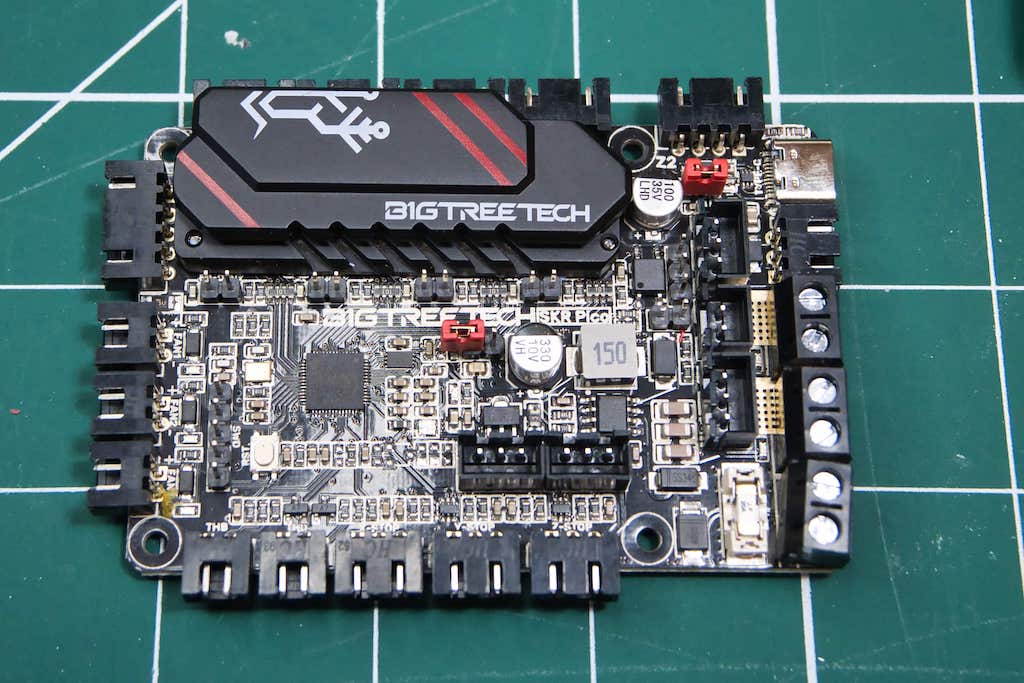
This works with a 12 or 24-volt power supply. Check out the post here with all the details of setting up the SKR Pico running grblHAL Grbl HotWire for CNC Foam Cutters
Which one should I choose?
Every controller discussed here works well for foam cutting. If you are starting, I would probably recommend the MKS Gen L V1 or V2, which is budget-friendly and well tested.
PC Controllers are the most versatile, and the software has many options, but the installation and configuration can be quite challenging. I have details on the website for both Mach3 and LinuxCNC. Mach3 isn’t being developed any more, but LinuxCNC is, which is free. The GUI can look quite intimidating if you are new to CNC, with not much of it used in CNC Foam cutting.
I don’t use PC controllers at the moment. My old parallel port PCs were starting to fail and took up a fair bit of space. So I now use microcontrollers, which I can use with a laptop.
Microcontrollers can use any of the boards discussed, and they will all work well. If you want the best, the Hobbild controller is the one to go for. The hot wire control is excellent and runs at 36 volts, so you can use 0.2mm thin wire and get some fantastic cuts.
If your budget can’t afford the Hobbild controller, then the SKR Pico is a good choice. You can use 24 volts, which gives excellent foam cuts. The thinnest wire I’ve been able to use is 0.4mm in diameter. Any smaller and the resistance is too high.
If you want to use the Arduino Uno with a CNC Shield, then you will need to use DevCNC Foam to control it, which is very good as I use it with the Hobbild controller. You will need to provide a separate power source for the hot wire. Some guys prefer to do this so they can use higher voltages. Which you can do with any of the others discussed.
If you have any questions, then I’ll be glad to answer them.


