Best Free CNC Software for 3- & 4-Axis Machines (2026)


Why would I use free CNC software?
You’ve built your 4 Axis hot wire foam cutting machine or 3 Axis router and now you need CNC control software. I often get questions through this website from fellow hobbyist asking what software they can use to cut foam wings, fuselages or parts on their CNC router. Most hobbyists are prepared to pay a reasonable price but when you start adding up the cost of the machine as well it soon adds up to a chunk of cash.
This article is an overview of what’s available to the hobbyists and then the follow-up articles will go into more detail for each solution. It’s not an exhaustive list and I’ve picked out solutions which I think are suitable.
I haven’t included anything about Laser Engraving software because as yet I have no expereince of it.
Example costs for paid CNC software
If you were to buy Mach3 or a Mach4 license at $175/$200 and the software I use for foam cutting DevWing Foam 2 €125 and DevFus Foam €95, then you’re up to $400/€340/£300. I’ve always had good support from DevCad who supplies the Foam software. So are there any free or low-cost?
There’s an old saying that you get what you pay for, and with CNC software that is sometimes true but surprisingly some of the free software is very good. You will find that the paid options tend to be more comprehensive.
4 Axis for Foam Cutting
I’ve created separate posts for these so please check
What Controller Software can I use for CNC Foam Cutters? – rcKeith
G-code generation software for CNC foam cutter – rcKeith
3 Axis for CNC Router and Mills
For CNC routers there are quite a few free options Your choice does depend on the hardware used. Most hobbyists now use USB-based or Wifi controllers running grbl, grblHAL or FluidNC. There are several free options available. The list isn’t exhaustive but these are the ones I’ve used or heard good reports about
- OpenBuild Control
- SenderIO
- UGS (Universal Gcode Sender)
- CNCjs
- Mach3/4
- LinuxCNC
OpenBuilds Control
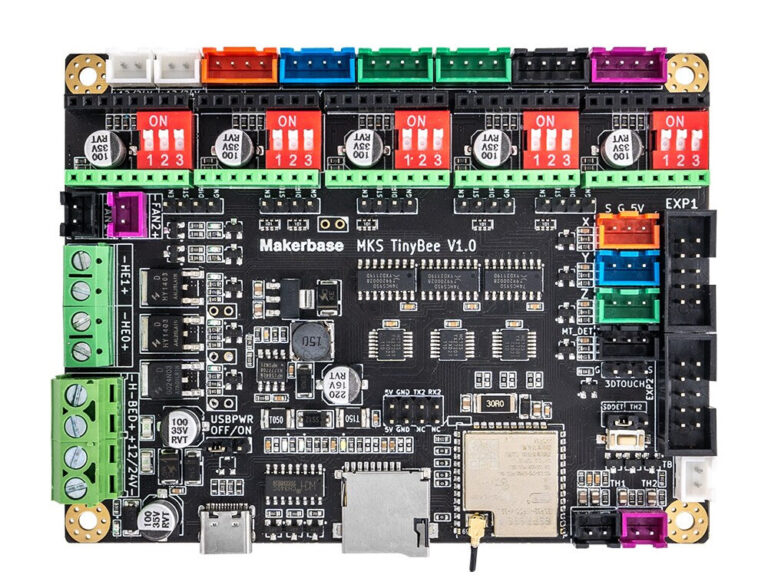
This is good software and works with most grbl-based controllers. I’ve used it on my CNC Router with great success with a needle cutter attachment and to cut many plywood parts for RC aeroplanes. I’m currently using an MKS Tinybee 32-bit controller running grblHAL. More specific details are here

SenderIO
This is now my preferred software for grblHAL controllers. It works well but the only downside is it is Windows only. Download it from here

UGS
I haven’t used UGS but it is widely used and will run on most operating systems as it’s Java-based.
CNCjs
Again I haven’t used CNCjs but it is widely used and will run on most operating systems because it uses Node.js
Mach3
I started with Mach3 many years ago and it’s capable software. But I wouldn’t recommend it now if you are new to CNC. Mach3 is quite old now and has been superseded by Mach4. I have a full post here on Mach3 explaining how to use it with newer computers. Mach3 is $175

LinuxCNC
This is free software and does require some effort to get working. You’ll need a dedicated computer running with the old parallel port or a special interface card. The details are here on using LinuxCNC for CNC routers.

Some of my best projects were made using LinuxCNC but I had an IT background and a few old computers so several years ago it made sense to use it. But I wouldn’t recommend it now for guys new to CNC. It’s fantastic software and is still being developed but it’s a steep learning curve.
Benefits of Using Free CNC Software
One benefit of using free/open source software apart from the obvious cost saving is the community. If you get stuck there is usually a wealth of knowledge and people willing to help. You may even be talking with the developers so you gain a better understanding of your system.
G-code Software for 3-Axis Router
OpenBuild CAM

This is a web application that can integrate with OpenBuilds Control. If you have that running it will transfer the g-code directly. Or you save the g-code. I have used it with my CNC Needle Cutter and it works fine. It’s quite easy to use but I have found DXF files with splines don’t import very well. It will only work with polylines.
Being web-based it will work on any computer with a compatible browser. Check the website for detail
Fusion 360
This is now my preferred option but it does take some time and effort to learn. I’ve used this for my latest F18 and have several more projects planned that will use it.


This is a powerful program that comes from the makers of AutoCAD and runs on Windows and Mac. Get it from this link https://www.autodesk.com/products/fusion-360/free-trial and there is an option for the hobbyist. I’ve used it for making motor mounts on my OX CNC router and a spinner for my Focke Wulf 190. I was able to export the STL file into the slicing software Cura which I then used my 3d printer to produce, check out the video.

Conclusion
As you can see there are solutions for both 3 and 4-axis machines. Which one you use depends on how complex your projects are. For 3-axis routers Fusion, 360 will do all you need plus a lot more, but it’s a steep learning curve. It is well worth the effort. I use it for all my router and 3D printing projects. For foam cutting, the paid options are more polished and perhaps a little easier to learn but if you are prepared to put in the time to learn the software then you may have all you need.