
How to choose Steppers Motors and Controllers for DIY CNC machines

When I built my first CNC foam cutter back in 2010, I had no idea what stepper motors or CNC controller I needed. I did what many beginners do: looked online at popular builds and copied what seemed to work. Luckily, my choices were good — that first machine is ran reliably for several years until I created a new design.
Since then, I’ve added a CNC router and a 3D printer to my workshop. CNC building can be addictive: incredibly rewarding when it works, but also frustrating when it doesn’t. Over the years, I’ve helped others get their machines running, and the excitement they feel when it finally works is priceless.
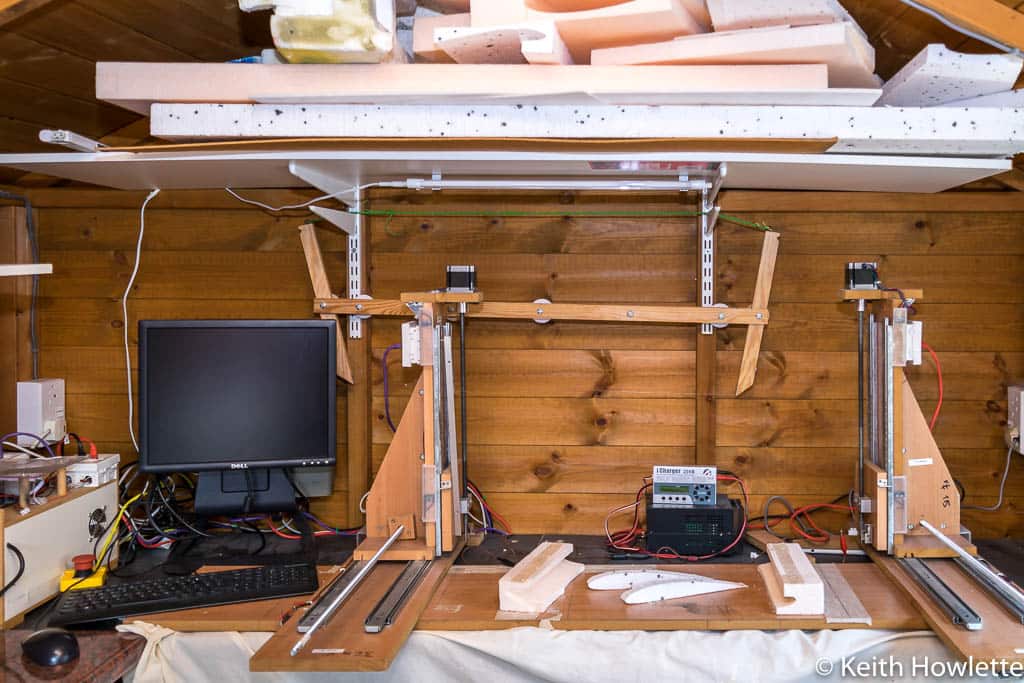
Old Design 
New Foam Cutter Design 
1000×750 Frame Needle cutter attached 
Creality K1 3d printer
This guide is meant to help you make informed choices about stepper motors, controllers, and power supplies without being buried in technical jargon
I’ve learnt so much and now have a CNC router and a 3d printer as well. CNC can be a bit addictive and very rewarding when it all works. But when it doesn’t work as expected or not at all it can be very frustrating. I’ve helped several guys all over the world to get their machines working and the elation they show when it works is priceless. So I hope this post will help you make an informed decision.
There are so many stepper motors and CNC controllers to choose from now how do you know which one to pick? If you search the Internet for answers you’ll probably be overwhelmed with all the technical information.
I have a simple method which works without too much techie stuff.
I get questions from time to time such as, will these stepper motors be OK, what CNC controller should I use.
My method is to see what motors are used by vendors who sell complete kits that are very similar to my build and use that as a starting point. There are ways to do this scientifically which involves a lot of maths and inertia calculations but it’s heavy going. If you are interested check this follow this link to motor sizing
Once we have the motors selected the rest is quite straightforward. It’s worked for me and if your build is a fairly simple router or hot wire machine then read on.
I’m a DIY hobbyist and have been running a foam cutter, CNC router and a 3d printer for several years now so in no way am I an expert. But what I can share with you is my experience on a modest budget with great success to help you can make informed choices. Check out some of my CNC projects to see what can be achieved.
Stepper Motors

Let’s start with these first and the rest should fall into place. You probably decided you are going to build a foam cutter or router and the first thing you usually start looking at is stepper motors. So what’s all this NEMA stuff about?
What does “NEMA” mean?
- NEMA (National Electrical Manufacturers Association) defines the faceplate size of the motor (the square front that mounts to your frame).
- It does not define power or torque.
Popular sizes for DIY CNC:
- NEMA17 → 1.7″ x 1.7″ faceplate (common in 3D printers)
- NEMA23 → 2.3″ x 2.3″ faceplate (common in routers/foam cutters)
Rule of Thumb: Motor Choice by Machine Type
| Machine Type | Typical Motor Size | Torque Range |
|---|---|---|
| 3D Printer | NEMA17 | 40–60 oz·in |
| Foam Cutter (light) | NEMA17 | 50–80 oz·in |
| Foam Cutter (heavy) | NEMA23 | 150–220 oz·in |
| Small CNC Router/Engr. | NEMA23 | 175–200 oz·in |
| Router (hard materials) | NEMA23/34 | 300–400 oz·in |
💡 Tip: Don’t overbuild. Foam cutting requires almost no cutting force (the hot wire melts the foam), so lightweight designs can use NEMA17s. Routers, on the other hand, need the torque to push a spinning bit into wood or aluminum.
Torque Rating
Stepper motors are rated by their holding torque in oz/in or N.M, N.cm Newtons per meter or centimetre. For example, a NEMA23 might say 175 oz/in (ounces per inch). So it can hold 175 ounces on an arm of 1 inch in length attached to the motor shaft. This is the holding torque. This is useful for comparing motors
We also need to note how much current the motor will draw and the voltage it needs to work at.
Bipolar vs. Unipolar Motors
Most hobby CNC machines use bipolar steppers:
- Higher torque output
- Require more complex switching (handled by driver modules)
- Nearly all motors you’ll buy today are bipolar-ready
Choosing Stepper Motors
Choosing a stepper very much depends on the type of machine you have or are going to build and the material you are going to cut. So I’ll show you my approach to choosing motors for a foam cutter and router.
Stepper Motors for 3d printers
Unless you are a real 3d printer building enthusiast I wouldn’t recommend building your own. 3d printers have come a long way and very good ones like the Ender-3 V3 SE can be purchased for $150.
Stepper Motors for Hot Wire CNC Foam Cutters
When we cut foam with a hot wire foam cutting machine it’s not actually being cut but melted. It’s referred to as cutting by radiance. So the load on the stepper motors is virtually nothing from the hot wire if its temperature and feed rate are correct. Nearly all of the load comes from the weight of the moving parts of the machine.
So NEMA17s should be fine if your machine is not too heavy, something around 50-80 oz/in should be OK. Vortec RC uses NEMA17 on their kit. http://www.vortex-rc.com/product/4-axis-diy-hot-wire-cnc-for-rc-hobbyists-aeromodellers-and-designers/
FoamLinx
My old CNC foam cutter used NEMA23 175oz/in rated at 2.8 Amps. The moving parts on my build weigh a little over 11KG or 25 lbs, so it’s a bit on the heavy side. It’s made from 3/4″ (18mm) High-Density FIbreBoad(HDF) which is very strong and stable but quite heavy. So I decided to use the bigger stepper motors with the recommended 24 Volt power supply.
My new updated design for 2026 uses 12mm MDF and features several changes and improvements. It reduces weight considerably and allows the use of NEMA17 steppers. Keep checking back for the updated design should be out soon.
Stepper Motors For CNC Routers
So let’s look at a couple of examples.
CNC Router Example
Routers deal with cutting forces, so stronger motors are needed:
- WorkBee (Ooznest UK) → NEMA23, ~175 oz·in
- Typical 6040 Router Kits → NEMA23, 175–200 oz·in
- Hard materials (aluminum, steel) → NEMA23/34, 300–400 oz·in
For
The WorkBee from Ooznest in the UK is based on the OpenBuilds design. It uses NEMA23 of 175 oz/in. If you check some of the offerings online for 6040 CNC routers you’ll quite often see in the description 57 size motors, which is the metric equivalent of 2.3 inches or NEMA23 and these usually come with 175-200oz-in motors
If you intend to cut very hard materials then high torque stepper motors will be required usually around 300-400 oz/in and you may need to go up to NEMA34 and you will need a strong frame to support that.
CNC controllers for the DIY machine
Now we know the stepper motors required for our project we can match them to a suitable CNC controller. The controller converts the g-code we’ve created and sends step pulses to the stepper motors. It also takes input signals from the machine such as limit switches and E-stops.
So there are 3 things we need to know:-
- Number of Axes. So usually 3 for routers and 4 for a foam cutter
- The current and voltage we need to supply to the stepper motors
- How do we intend to connect the computer to the CNC controller
Number of Axes
CNC routers can use 3 or 4-axis controllers. There are only 3 planes of movement X, Y and Z but some designs use two stepper motors on one axis. My OX CNC router uses two NEMA 23 on the Y-Axis as it’s a gantry-type router. Some move the table bed for the Y-Axis on sliders and only need 1 motor for the Y-Axis. Like a 3d printer bed

Foam cutters need 4 axes to allow the hot wire to move in any direction on 4 planes usually X, Y, Z and A.
Current and voltage we need to supply to the stepper motors
So you’ve decided how many stepper motors you need and the torque rating. It’s then just a matter of matching to a suitable controller. All controllers will have stepper drivers that are either individual modules or integrated into the controller board. The stepper drivers are designed to supply current and voltage, which in most cases is adjustable. It’s important to match the current with the stepper motor. Stepper motors can work at very low voltages but they are usually driven at much higher voltages up to 8 times by a chopper driver. If you would like more information check this link This gives higher torque and speed.
If you use a stepper that needs 2.8 amps and your drivers only supply 1.5 amps it may still work but slowly and may not be enough to overcome the load.
Generally, NEMA17’s are run on 12 volts and NEMA23 24 volts. If you supply less then the motors will turn slowly or not at all. Its to do with something called back EMF. So when you are deciding on the controller check the current rating of the steppers and make sure the controller or driver modules can be adjusted to match as close as possible but don’t supply more or the motor may fail.
My old foam cutter used 57BYGH56-401A NEMA 23 which are rated at 2.8 amps and 3.36 Volts per phase. I run this with a 24-volt power supply and the current is at 2.25 amps set via DIP switches on the board. This has run for several years without any issues
Power Supply

The power supply needs to be able to deliver the voltage and current for your chosen motors and controller. Going bigger on the current won’t hurt but the voltage needs to match the controller’s voltage.
So for my old foam cutter, I used 4 x 57BYGH56-401A NEMA 23 rated at 2.8 amps and the controller needs 2 amps. So 4 x 2.8 amps plus 2 amps for the controller gives 13.2 amps. If we multiply that by 24 volts to give Watts that comes to 316.8 Watts. Powers supplies can be rated by Amps or Watt so I used a 15 Amp 350 Watt supply.
For my latest foam cutter, it uses 4 x 0.9 amps with the controller needing 1 amp. So I would only need 4 x 0.9 + 1 = 4.6 amps x 12v so I should only need a 55 Watt power supply. I would use a 12v 120 Watt power supply. If I ever need to replace the motors and want to use a slightly higher current then it would be OK.
Connecting the computer to the CNC controller
There are quite a few options to connect your computer whether it is a laptop or desktop to the CNC controller. The connection is also dependent on the software you intend to use.
Mach3 is probably the most widely used for CNC routers.. It was designed to use the parallel port with a DB25 (25 pins) cable. The parallel port is now obsolete and Mach3 would only run on Windows 32bit computers with the parallel port driver. This meant Windows XP was the last version you could use. But you can use it on modern computers with specialized hardware and drivers. My article here has much more detail 6 Solutions for Mach3 Obsolete Parallel Port Interface
Don’t discount the old parallel port if you’ve got an old desktop computer laying around with a couple of gigabytes of RAM it will work just fine with Mach3 and LinuxCNC. You can usually pick them up very cheaply as well. This is a very reliable solution and I’ve used it for years on both Mach3 and LinuxCNC. You can also buy parallel port cards to add to a more modern desktop machine. This way you can dedicate the computer just to CNC. The majority of CNC controllers sold on eBay and Amazon that support Mach3 and LinuxCNC are still parallel port versions.
If you’d prefer to go USB then you have a couple of options.
- Use an Arduino-based controller
- Use a USB controller board or adapter for Mach3 or Mach4. LinuxCNC doesn’t support USB
Arduino-based USB controllers
3d printers use Arduino-based boards and these are very popular. CNC routers and foam cutters can use these as well. The only downside is that you need to be able to load compile and upload firmware to the board. This is fairly easy and there are many tutorials on how to do this.
You won’t be able to use Mach3 or Mach4 with this setup. The Universal G-code Sender(UGS) is probably the most popular software to control the board.
USB for Mach3
To use USB with Mach3 you can buy a specialized controller board with drivers that support Mach3 or a USB to parallel adapter to connect to an old parallel port controller. This isn’t a generic adapter but a specialized CNC USB adapter. The best one of these is the UC100. Check my post 6 Solutions for Mach3 Obsolete Parallel Port Interface
Ethernet Controllers
These use your network port to connect to a specialized controller card or adapter that can connect to a parallel port controller, k
✅ Advantages
- Very stable communication → Ethernet is designed for continuous data transfer, less prone to noise than USB.
- Long cable runs → Can use 10–30 meters of standard network cable without issues.
- Better real-time performance → More consistent timing → smoother motion, higher step rates.
- Works with modern PCs → Doesn’t rely on legacy parallel ports or outdated USB drivers.
- Expandable → Many Ethernet boards support advanced features (spindle control, probing, multiple I/O).
❌ Disadvantages
- Higher cost → Usually 2–3× the price of USB or Arduino boards.
- Setup complexity → Requires configuring IP addresses/network settings, which can be confusing for beginners.
- Overkill for small/light machines → The extra stability might not matter much for a foam cutter or light router.
⚖️ Quick Recommendation for Hobbyists
- Foam cutter or small CNC router (wood, plastics, PCBs):
USB controllers (Arduino GRBL, Mach3 USB boards) are fine, cheaper, and simpler. - Mid-large CNC router (aluminum, hardwoods, longer run times):
Ethernet controllers (e.g., UC400ETH, SmoothStepper, Mesa boards for LinuxCNC) are worth it for stability and smooth motion.
Suggested configurations
In these suggested configurations I’ll show what I would purchase using the following criteria. Machine intended use, budget and connection to the computer
CNC router used to cut materials from softwoods up to aluminium
If your budget is limited and you have an old desktop computer with a parallel port then use LinuxCNC with a 3 or 4-axis controller and NEMA23 stepper motors rated at 175 oz-in or better. Mach3 is $175 so you’ll save on that and I’ve done a complete tutorial on this configuration with a video as well here

If your budget permits and you prefer to use USB with Mach3/4 then I would use one of these USB breakout boards with TB6600 driver modules or the Geckodrive G251X drivers.
Hot Wire CNC foam cutter
If your budget is limited I would use the same option as the budget router If you prefer to use USB and are happy uploading firmware to Arduino boards then the option below would be a good choice.
You need to keep your build light as it uses NEMA17 motors. My new USB Foam Cutter build is here https://rckeith.co.uk/how-to-build-a-usb-cnc-hot-wire-foam-cutter/
I prefer to use the DRV8255 or the TMC2100 driver modules because they can handle a little more current than the A4988 and always use a cooling fan.
| Qty | Description |
|---|---|
| 1 | Ardunino Mega 2560 |
| 1 | RAMPS 1.4 Board with Drivers DRV8825 are preferred |
| 4 | Stepper Driver get them with the RAMPS Board |
| 1 | 12 Volt 350 Watt Power Supply |
| 12 Volt Cooling Fan | |
| 4 | NEMA17 Stepper Motors 1.5 Amp |
| 4 | 6pin PH2.0 to 4pin XH2.54 Connector 4 Lead Wire |
Final Thoughts
As you can see there is a lot to consider when choosing parts for your build. As I said earlier I’m no expert on this subject but I’ve had a good experience in CNC routing, foam cutting and 3d printing and I hope this may help in your decisions.
There’s no single “correct” answer when it comes to CNC components. Your build weight, cutting material, and budget all affect your choices.
The best shortcut I’ve found is this:
👉 Look at what reputable kit vendors are using for machines similar to yours.
That approach has never let me down, and it keeps things simple.
If you’re building your first machine, start light (foam cutter, engraver, or router for softwoods). Once you’re confident, move up to heavier, more powerful builds.
Please use this post as a guide and check out other resources as well and you should be able to make some informed decisions on your purchases.


